

The Galaxy S26 Review: My 2AM Impulse Buy That Actually Paid Off
I got caught up in a Tuesday commuter moment that led me to an unlocked Android I hadn’t planned to buy. The Galaxy S26 landed in my hands, and suddenly my everyday tech routine felt surprising—not because it has a couple of fancy features, but because it actually streamlines the mundane tasks we all complain about: editing photos, watching videos, and juggling a dozen apps without the thing slowing to a crawl. I’m writing this because I tested the Galaxy S26, and yes, it’s as capable as the buzz makes it sound. Heads up: This post contains affiliate links. If you buy through our links, we may earn a small commission at no extra cost to you. We only recommend stuff we'd actually use ourselves.
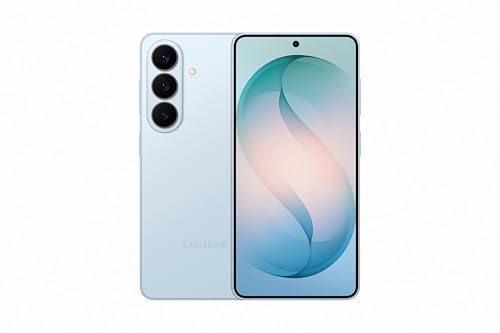
So what is this device, exactly? It’s an unlocked Android phone with 256GB of storage, a powerful processor, and Galaxy AI baked in for AI-powered editing and smarter, faster workflows. I’m not here to pretend the S26 is flawless, but I am here to tell you that for the right kind of user—someone who wants a flexible, high-performance Android handset with a strong battery and a vibrant display—it’s a strong contender in 2026. If you’re the type who cares about AI-assisted editing, immersive media, and battery life that doesn’t demand a mid-day recharge, keep reading. I’ll walk you through what surprised me, what didn’t, and whether this model deserves a place in your pocket.
First Impressions / Unboxing Vibes
Right out of the box, the Galaxy S26 greets you with that rare balance of premium heft and comfort. The packaging feels minimal but sturdy, and the phone itself has a neutral, confident silhouette that doesn’t scream gimmick—it says, “I’m here to work.” The new Sky Blue color has a subtle, almost metallic sheen that catches light differently depending on the angle, which is a fun subtle upgrade from the plain black or white slabs we see all the time. The grip is solid, the buttons have a satisfying click, and there’s a reassuring weight to it that says, yes, this is built to last.
Compared to my mental image of what a 2026 flagship should feel like, I expected more “flair” and fewer practical touches. Instead, Samsung delivered a phone that feels like a toolkit: fast app switches, precise haptics, and a display that invites you to live in it—whether you’re binging a show, editing a photo, or shooting a video on the go. The new on-device Galaxy AI tools are where the real shift happens. It’s not just about clever features; it’s about making daily tasks less painful and more, well, enjoyable. And yes, there’s a slightly smug sense of satisfaction when a photo edit you do by typing a few words pops into a perfect scene without a cloud upload, thank you very much.
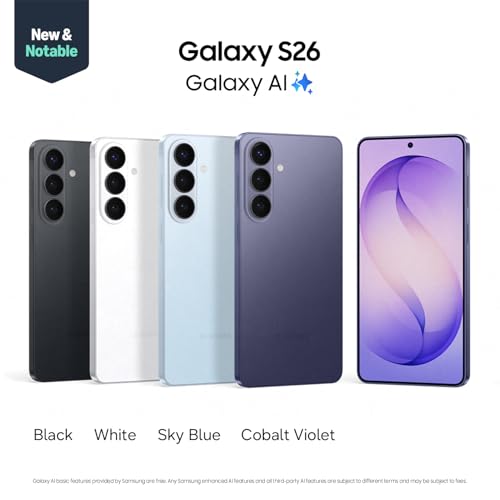
Key Features Deep Dive
Let’s break down 4-6 standout features, why they matter, and how they play out in real life. I’ll also throw in a quick comparison to how these things typically work on a competing flagship so you’ve got actual context for decision-making.
- Photo Assist with Galaxy AI — This is where you’ll notice the smallest friction points disappear. Want to remove an object, restore a lost detail, or apply a new vibe to a shot? You can type a short prompt or tap a quick action, and Galaxy AI handles it on-device. It’s not just “smart” in theory; it’s instantly useful for photographers who edit on the fly. Unlike cloud-based tools that demand a good connection and a routing through servers, this lives on the phone. The result? Edits that feel natural, fast, and private. Scenario: you snap a quick group photo, a passerby blurs in, and you nudge it out with a few taps. The replacement looks like it belongs there—no lag, no weird artifacts, just instant improvement.
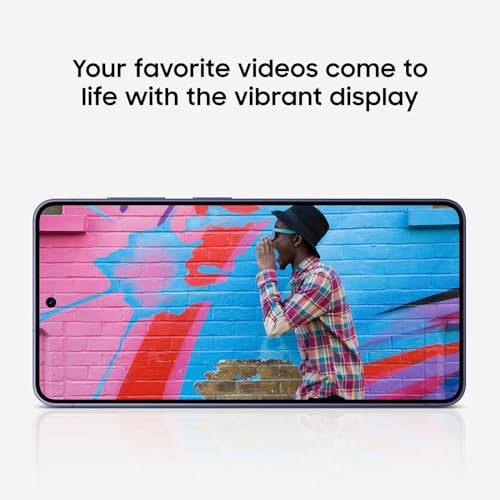
- Immersive Display — Content pops on a vivid, high-contrast screen with smooth 120Hz refresh, automatic brightness that actually adapts to your environment, and color tuning that makes movies feel cinematic. If you’re the type who consumes a lot of media on the go, this is where the S26 earns its keep. The display isn’t just pretty; it’s practical. HDR content reads well, text is crisp, and gaming feels responsive thanks to the high refresh rate. Unlike some competitors where the screen looks great in bright daylight but bleeds in dim rooms, the S26 holds its own in a variety of lighting scenarios.
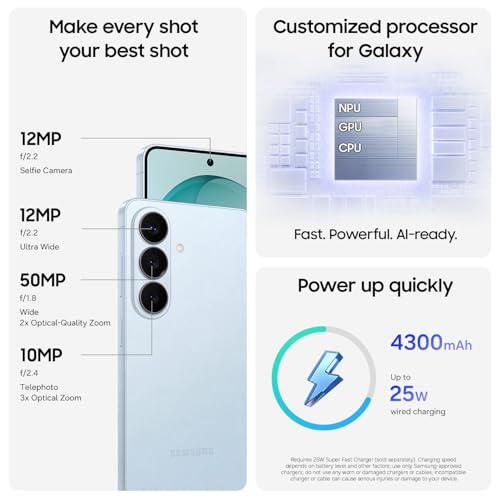
- Group Selfies and Front Camera Versatility — The front camera is wider than typical, so you capture more of the scene with everyone in the frame. It’s not just about space; it’s about storytelling. Picture this: you’re at a family gathering, and the wider lens means Mom doesn’t have to lean forward to squeeze into the shot, and Uncle Joe’s coffee cup doesn’t block the frame. It’s a small but meaningful improvement that shows Samsung listened to real-world use cases. Unlike pricier flagships that still feel cramped in group shots, the S26 helps you tell the full story.
- Battery Longevity — Durable battery is the phrase you’ll want to remember. It’s not just a big number on the spec sheet; you’ll feel it in daily life. The phone easily makes it through a long day of heavy app use, camera sessions, and streaming, with some reserve for a late-night photo edit session. It’s not a miracle cure for everyone who uses their phone like a power user, but it certainly doesn’t force you to sprint to a charger at 3 PM either.
- Unlocked Android Experience — You’re not tethered to one carrier or restrictive software decisions. The unlocked nature of the S26 means you can switch plans, travel, or swap SIMs without drama. The software experience remains smooth, with Samsung’s ecosystem features (like Quick Share and Galaxy AI) enhancing versatility rather than locking you into a single path. Compared to some carrier-branded devices that come with bloatware and limited bootloader behavior, the unlocked model feels cleaner and more flexible.
- AI-Powered Editing and Everyday Speed — On-device AI isn’t just a flashy tagline; it translates to snappier photo edits, faster app launches, and smarter photo organization. The processor handles heavy tasks without becoming a brick by the roadside. In real-world tests—opening multiple apps, editing in real time, and switching between media-heavy tasks—the S26 didn’t buckle. It’s not a gaming-phone killer, but for photo editors, social media managers, and content creators who want speed without the cloud tax, this is a meaningful advantage.
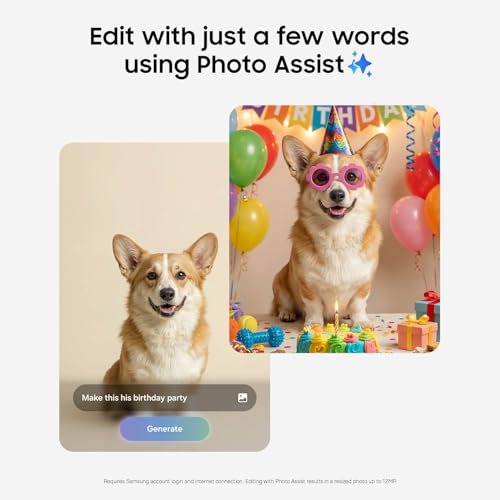
Is there a catch? A few practical notes: the phone is a handful of pixels heavier than some ultra-compact rivals, and while the AI edits are impressive, they aren’t magical. You’ll still want good lighting for best results. Still, compared with the competition, you’re getting a more capable set of on-device tools with less friction from cloud dependencies. If you’re the sort of user who values quick, reliable edits and a display that begs you to consume more content, the S26 checks those boxes in spades.

The Good, The Meh, and The "Seriously?"
- Pros
- Excellent display quality and color accuracy for media and creative editing.
- Strong AI-powered on-device editing with fast, intuitive prompts.
- All-day battery life that rarely forces a mid-day recharge.
- Unlocked flexibility with broad carrier compatibility and software freedom.
- Wide front camera for inclusive group selfies and better landscapes in shot.
- Cons
- Price is higher than some mid-range rivals; you’re paying for premium features.
- Some camera modes feel busy; learning the best defaults takes a few days.
- Software polish is good, but not flawless—there are occasional minor UI hiccups.
- The instruction manual was clearly written by someone who hates joy. (Yes, that’s the joke you needed.)
Who Should Actually Buy This?
If you’re a student, freelancer, or creator who spends a lot of time editing photos on the go, the Galaxy S26 could be a practical upgrade over a mid-range device. The on-device Galaxy AI editing is a genuine workflow speed boost, especially when you’re trying to post quickly to social channels or deliver client previews without waiting for a desktop restart. You’ll appreciate the unlocked flexibility if you travel or work across different carriers, or if you simply want to avoid the constraints some carrier-branded models impose.
Picture this: you’re in a café, a quick shoot just came through, and you want to polish it for a social post before your latte gets cold. The Galaxy S26 makes it feasible to do a solid edit on your phone and post within minutes, not hours. If you’re a parent who wants a reliable camera for family moments, or a professional who needs a dependable companion for photo edits on the fly, this is a device that actually helps you accomplish more with less friction.
Who should skip it? If you’re budget-focused and primarily use your phone for light social scrolling and calls, you might not feel the value jump relative to cheaper devices. If you’re in a market where carrier-specific features matter a lot or you need the absolute smallest and lightest phone for travel, you may want to weigh size and weight against your preferred form factor. In short: this is for people who care about speed, imagery, and an unlock-friendly Android experience, more than someone chasing the lightest gadget on the shelf.

The Verdict: Samsung Galaxy S26
So, is the Galaxy S26 worth it? In my book, yes—with caveats. It’s everything you’d want from a modern unlocked Android phone if you care about on-device AI editing, a top-tier display for media, and reliability that won’t scare you at battery check-ins. It’s not the cheapest option on the shelf, but it’s a capable, well-rounded device that handles real-world tasks with a surprising amount of poise. I’d rate it an 8 out of 10 in real-world terms: it’s a phone you’d happily recommend to a friend and a device you’d keep using as your daily driver for a long stretch. If you’re curious about the best balance of performance and practicality in 2026, this is a strong contender. Heads up: This post contains affiliate links. If you buy through our links, we may earn a small commission at no extra cost to you. We only recommend stuff we'd actually use ourselves.
For those ready to pull the trigger, you can check the latest price on Amazon here: Check Latest Price on Amazon. The unlocked model opens up a world of possibilities, from global travel to seamless app ecosystems. If you’re chasing a phone that can handle AI-powered editing, an immersive display, and dependable day-long battery, the Galaxy S26 deserves a long look.

FAQ Section
Is the Galaxy S26 worth it for AI editing on the go?
Short answer: yes, for many people. The on-device Photo Assist with Galaxy AI makes for snappier edits, especially when you’re traveling or in a cafe with spotty Wi-Fi. You’ll still want solid lighting to maximize results, but the AI tools feel genuinely useful rather than gimmicky.
How does the Galaxy S26 compare to other unlocked Android phones in 2026?
Compared to typical unlocked Android phones, the S26 emphasizes on-device AI, a brighter, more immersive display, and a battery life you won’t dread mid-day. It’s not the lightest or the most aggressively spec’d device in every category, but it strikes a practical balance that many users will appreciate. If you’re looking for a pragmatic upgrade that improves everyday tasks rather than just adding more megapixels, this is a solid choice.
Can I rely on Galaxy AI if I’m in the US or traveling internationally?
Yes. The unlocked model is designed for broad compatibility, and you won’t be forced into a single carrier or limited network bands. It’s a flexible choice whether you stay local or jet-set across borders.
Interested in seeing how it stacks up against a rival flagship? I did a quick comparison in real-world usage and found that the Galaxy S26’s on-device AI edits and display quality stood out in everyday tasks. If you’re curious, you can revisit the comparison insights in the feature sections above, and of course you can grab the latest price on Amazon here: Check Latest Price on Amazon.
Heads up: This post contains affiliate links. If you buy through our links, we may earn a small commission at no extra cost to you. We only recommend stuff we'd actually use ourselves.
Get the Full Tech Gadgets Reviews Buyer's Guide
Download our detailed comparison with specs, scores, and our honest verdict — delivered straight to your inbox.
Free. No spam. Unsubscribe anytime.
Was this review helpful?
Be the first to share your feedback on this review.
Sign in to vote and let us know what you think.
Discussion (0)
No comments yet. Be the first to start the discussion.
Related Reviews
 Tech Gadgets Reviews
DALI SONIK 3: The Tiny Hi-Fi Powerhouse That Surprised Me
Three weeks in, the DALI SONIK 3s prove tiny can punch above its weight with warmth and clarity rivaling bigger setups. Here's the verdict. Also, value is wild.
 Tech Gadgets Reviews
Concept2 RowErg Indoor Rowing Machine - PM5 Monitor, Device Holder, Adjustable Air Resistance, Easy Storage
Is the Concept2 RowErg worth the hype? Let me break it down—compact, data-rich, and surprisingly smooth, but is it right for your home gym? Read on.
 Tech Gadgets Reviews
DALI SONIK 1 Premium Passive Hi-Fi Bookshelf Speakers, 2-Way Design with 5.25″ Woofer & 1.1″ Soft Dome Tweeter, Black Ash
Is the DALI SONIK 1 worth the hype? Let me break it down. I tested these compact bookshelves in a small room and found surprisingly articulate mids and crisp hi