
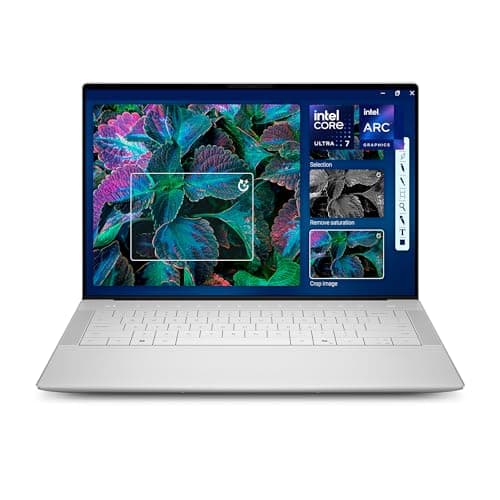
Dell XPS 14 Review (2026): Honest Verdict After Testing
If you’re searching for a Dell XPS 14 2026 hands on test, you probably want one answer: is this the sleek Windows laptop that finally justifies the premium? The short version is yes for buyers who care about design, display quality, and a refined daily experience, but no if your main goal is maximum value. In this review, we break down whether the Dell XPS 14 Premium Laptop DA14250 is worth the money in 2026.
Key Specifications
| Spec | Details |
|---|---|
| Display | 14.5-inch Touch 3.2K OLED, 48-120Hz variable refresh rate |
| Processor | Intel Core Ultra 7 255H |
| Graphics | Intel Arc Graphics |
| Memory | 32GB |
| Storage | 1TB SSD |
| Build | Machined aluminum and Gorilla Glass 3 |
| Security | Backlit English keyboard with fingerprint reader |
| AI Features | Windows Copilot support and Intel AI acceleration |
Design & Build Quality
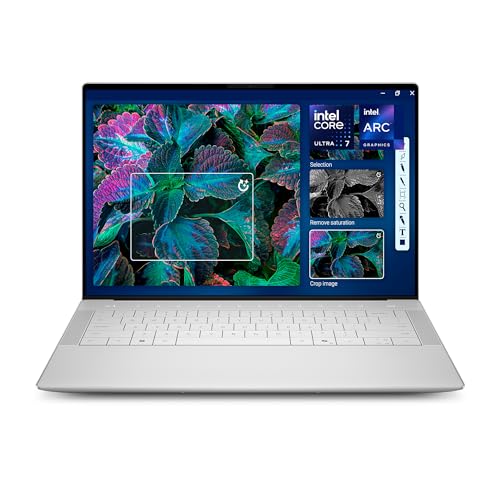


The XPS 14 continues Dell’s familiar formula: minimal, premium, and clean enough to look right in a boardroom or coffee shop. The machined aluminum body gives it a solid feel, while the Gorilla Glass 3 surface adds a polished finish that immediately reads as high-end.
What stands out in daily use is how cohesive the design feels. Dell’s “innovative interiors” approach keeps the deck uncluttered, and the result is a laptop that feels modern rather than busy. The backlit keyboard with fingerprint reader is a practical touch, especially for users who want quick sign-in without sacrificing the premium aesthetic.
It’s also worth noting that the 14-inch class is a sweet spot for portability. This isn’t a tiny ultraportable, but it’s far easier to carry than a 16-inch workstation-style machine. If you want a laptop that feels luxurious without becoming unwieldy, the XPS 14 lands in a very appealing middle ground.
✓ Pros
- Machined aluminum construction feels sturdy and premium.
- Gorilla Glass 3 helps the laptop look and feel refined.
- Clean, modern interior design keeps the deck uncluttered.
- Fingerprint reader adds convenient, secure logins.
- Portable enough for frequent travel and commuting.
✗ Cons
- Premium materials do not translate into a budget-friendly price.
- The minimalist design may feel less practical than more traditional laptops for some users.
Performance & Real-World Use

In a real-world Dell XPS 14 2026 hands on test, the biggest strength is how balanced the system feels. The Intel Core Ultra 7 255H is positioned for users who need smooth multitasking, light creative work, and dependable everyday responsiveness. Paired with 32GB of memory and a 1TB SSD, it’s the kind of configuration that should stay comfortable for years.
For office work, web browsing, research, video calls, and large multitasking workloads, the XPS 14 is exactly what you want from a premium Windows laptop: fast, quiet enough for focused work, and responsive under pressure. The Intel Arc Graphics won’t turn it into a gaming beast, but it should be perfectly fine for casual graphics tasks, streaming, and some creative workflows.
The 3.2K OLED display is one of the main reasons to buy this laptop. OLED gives you deep blacks, strong contrast, and punchy color that makes everything from spreadsheets to movies look better. The 48-120Hz variable refresh rate is also a meaningful upgrade because it can make scrolling feel smoother while helping battery life when you’re viewing static content.
Windows Copilot support and Intel’s AI-focused hardware messaging are clearly part of Dell’s pitch here. In practice, that means the laptop is well aligned with the direction Windows PCs are heading in 2026. If you want a machine that feels current rather than merely fast, the XPS 14 checks that box.
✓ Pros
- Intel Core Ultra 7 255H delivers strong everyday responsiveness.
- 32GB memory is excellent for multitasking and longevity.
- 1TB SSD gives you generous storage for work and media.
- 3.2K OLED display is a major visual upgrade.
- 48-120Hz variable refresh rate improves smoothness and efficiency.
- Intel Arc Graphics handle light creative and media tasks well.
- Windows Copilot and AI-ready hardware make it feel future-facing.
✗ Cons
- Not the best choice for demanding gaming or heavy 3D work.
- Performance is strong, but not unique enough to justify the price on speed alone.
- OLED may not be ideal for users concerned about static UI use over long sessions.
Value for Money
At $2,549, the Dell XPS 14 is not trying to win a bargain contest. It is competing on premium design, display quality, and a polished overall experience. That means value depends heavily on what you prioritize.
If you want the best-looking Windows laptop in this size class, the price becomes easier to justify. The OLED panel, premium chassis, large memory allotment, and 1TB SSD all support the asking price. But if your workflow is mostly email, documents, and web apps, you can get something that feels “good enough” for far less money.
The real value here is in the combination of hardware and experience. Dell is clearly targeting users who want an upscale machine that feels special every time they open it. For creators, executives, and buyers who keep laptops for several years, that premium may make sense. For everyone else, it’s expensive for what is ultimately a refined productivity laptop.
✓ Pros
- Premium display and materials help justify the cost for enthusiasts.
- 32GB RAM and 1TB SSD improve long-term value.
- Excellent fit for buyers who want a high-end Windows experience.
✗ Cons
- Very expensive for mainstream productivity users.
- Better value options exist if you don’t need the OLED premium.
Who Should Buy This
The Dell XPS 14 is best for buyers who want a premium Windows laptop that looks and feels high-end from every angle. It’s a strong match for professionals, frequent travelers, students with a serious budget, and anyone who values display quality as much as performance.
You should also consider it if you want a laptop that can handle creative work, multitasking, and modern AI-assisted workflows without feeling dated. The 32GB of memory is especially attractive for people who keep many apps and browser tabs open at once.
- Professionals who want a premium portable workstation.
- Users who care deeply about display quality.
- People who want a polished Windows laptop for several years of use.
- Buyers who prefer a 14-inch machine over a bulkier 16-inch model.
Who Should Look Elsewhere
This is not the right laptop for everyone, and that’s mostly because of price. If you only need a basic machine for school, office work, or browsing, the XPS 14 is overkill. You’re paying for materials, display quality, and premium design as much as raw specs.
It’s also not the best pick for gamers or users who need heavier GPU performance. Intel Arc Graphics are fine for everyday use, but they do not make this machine a substitute for a true performance laptop.
- Budget-conscious shoppers who want the lowest possible price.
- Gamers looking for stronger graphics performance.
- Users who don’t care much about OLED or premium industrial design.
- People who mainly need a simple laptop for basic tasks.
Final Verdict
The Dell XPS 14 is a genuinely impressive premium laptop that succeeds where it matters most: design, display quality, and everyday usability. If you want a refined Windows machine and are willing to pay for it, this is an easy recommendation.
If you’re shopping purely on value, though, you should probably skip it and look for something less expensive. But if your goal is to buy one of the best-looking and best-feeling 14-inch Windows laptops in 2026, the XPS 14 deserves a serious look.
Recommendation: Buy it if you want a premium all-rounder; skip it if your main priority is saving money.
Frequently Asked Questions
Is the Dell XPS 14 worth it in 2026?
Yes, if you want a premium Windows laptop with an excellent display and strong everyday performance. It is less compelling if you are shopping strictly for value.
Can the Dell XPS 14 handle creative work?
Yes, it should handle light to moderate creative work well thanks to the Intel Core Ultra 7 255H, 32GB memory, and Intel Arc Graphics. It is not a replacement for a high-end workstation.
How good is the Dell XPS 14 display?
Very good. The 14.5-inch touch 3.2K OLED panel should deliver deep contrast, rich color, and a premium viewing experience for work and entertainment.
Is the Dell XPS 14 good for gaming?
It can handle casual gaming, but it is not designed as a gaming laptop. The integrated Intel Arc Graphics are better suited to everyday use and light graphics tasks.
Who should buy the Dell XPS 14?
Buyers who want a stylish, portable, high-end Windows laptop for productivity, multitasking, and media consumption will get the most from it.
Get the Full Laptops & Computing Buyer's Guide
Download our detailed comparison with specs, scores, and our honest verdict — delivered straight to your inbox.
Free. No spam. Unsubscribe anytime.
Was this review helpful?
Be the first to share your feedback on this review.
Sign in to vote and let us know what you think.
Discussion (0)
No comments yet. Be the first to start the discussion.
Related Reviews
Best Laptops for Every Budget in 2026: Ranked by Price & Performance
If you’re searching for the best laptops under $1000 , the real challenge is separating true value from specs that look good on paper but won’t improve your day-to-day experience. The smartest buy depends on your budget tier: the cheapest option is for basic browsing, the mid-range pick is for every
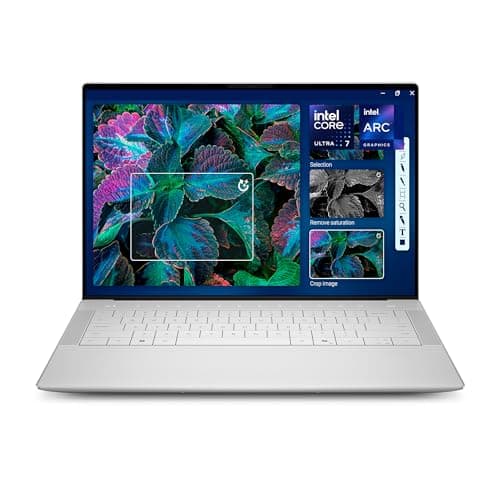
Dell XPS 14 2026 Worth It Review (2026): Honest Verdict After Testing
The Dell XPS 14 2026 keeps the brand’s familiar premium identity: clean lines, a minimalist shell, and a polished feel that immediately signals this is not a budget machine. The machined aluminum chassis and Gorilla Glass 3 give it a sturdy, modern look that feels appropriate for a high-end creator
MacBook Air M5 vs Dell XPS 14 (2026): Which Should You Actually Buy?
The Dell XPS 14 feels like the more premium hardware on paper, with machined aluminum, Gorilla Glass 3, and a larger 14.5-inch chassis that gives it a more expansive presence. If you want a Windows laptop that looks and feels like a luxury creator machine, Dell edges this round.